TLS Deep Dive: From Certificates to Mutual Authentication
TLS DevOps Cloud Security Certificates HTTPS Networking Mutual TLS OpenSSL X.509
When you see a little padlock 🔒 next to a website’s URL, it quietly signals that your data is safe — but behind that simple icon lies a sophisticated protocol called Transport Layer Security (TLS).
TLS protects your data from hackers, makes sure you’re talking to the real website, and keeps your connection private. But how exactly does this invisible shield work?
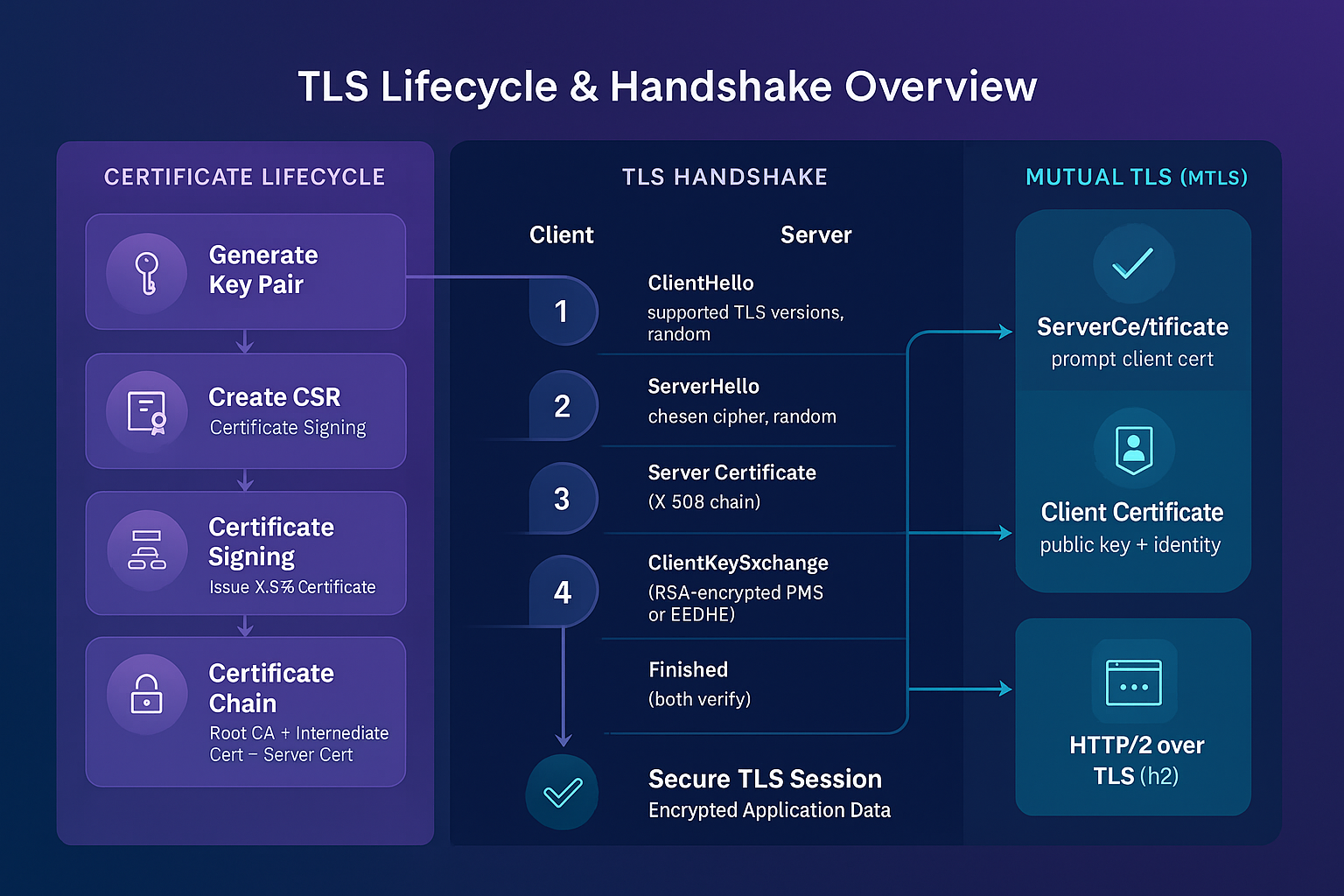
This guide explains TLS step by step — how certificates are made, how browsers know who to trust, how digital signatures and encryption work, and even how two systems can trust each other using Mutual TLS (mTLS).
🧠 What to Expect:
- Symmetric vs Asymmetric encryption
- SSH key authentication basics
- How CSRs and certificates are generated and signed
- What’s inside an X.509 certificate
- How browsers validate trust
- Digital Signatures
- RSA vs. ECDHE key exchange (with deeper insights)
- TLS handshake step-by-step
- How mutual TLS enables two-way authentication
- Real OpenSSL commands to try on your own
Let’s roll up our sleeves and decode the security protocol that powers almost everything online.
TLS secures online communication using asymmetric encryption for identity verification and symmetric encryption for speed. Certificates prove identity, and mutual TLS enables two-way trust. This guide covers everything from OpenSSL commands to TLS handshake internals.
Table of Contents
- Understanding Keys — Symmetric and Asymmetric
- Laying the Foundation — Keys and CSRs
- Certificate Authorities and Signing
- Anatomy of an X.509 Certificate
- Building Trust — How Clients Verify Certificates
- Deep Dive — Key Exchange Methods
- TLS Handshake Step-by-Step
- One-Way vs Mutual TLS (mTLS)
- Hands-On Commands and Troubleshooting
- Conclusion and Next Steps
Part 0: Understanding Keys — Symmetric and Asymmetric
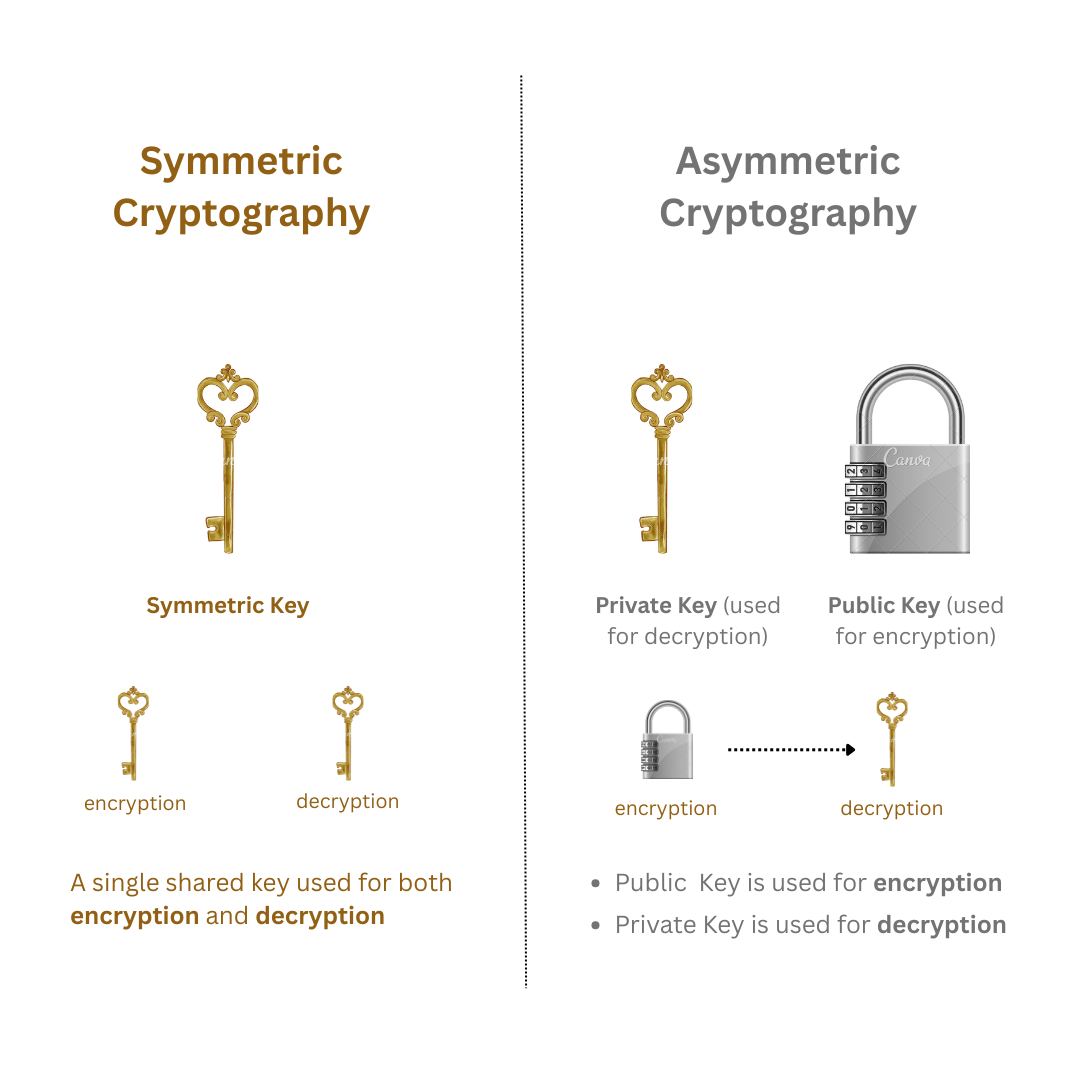
🔐 Symmetric Encryption
- One key is used for both encryption and decryption.
- 100–1,000 times faster and better for large data because it uses mathematically simpler and less computationally intensive computations than asymmetric methods.
- Example: AES, used for actual TLS data encryption after the handshake.
- Problem: How do we safely share the key with the other party?
- Solution: We call in the cryptographic superheroes—Asymmetric Encryption to the rescue!**
🔐 Asymmetric Encryption
-
Uses a public-private key pair:
- Public key is like a padlock — can be distributed freely.
- Private key is the key to the padlock — must be kept secret.
-
Public key encrypts; private key decrypts.
-
Common algorithms: RSA, ECDSA
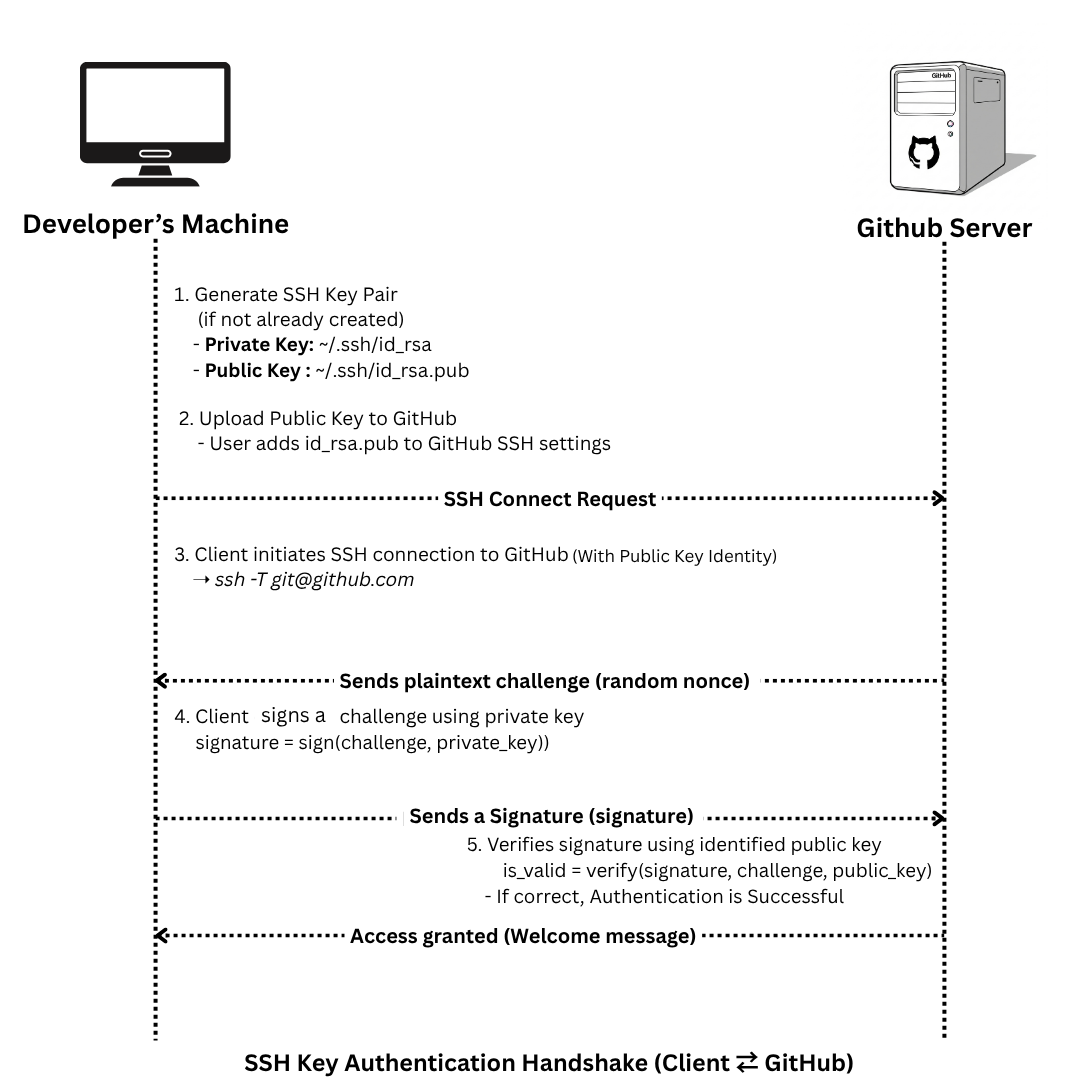
🧪 Real-World Example: SSH Authentication (GitHub)
- Generate key pair:
ssh-keygen -t rsa -b 4096 -C "[email protected]"-
Output:
~/.ssh/id_rsa→ private key (never share this)~/.ssh/id_rsa.pub→ public key
-
Add the public key to GitHub:
- Go to GitHub → Settings → SSH and GPG Keys → Add SSH Key
-
GitHub stores it in its server-side
authorized_keys. -
During SSH connection, your machine uses the private key to prove your identity.
🔁 How TLS Uses Both
TLS combines both encryption methods for efficiency and security:
-
Handshake Phase – uses asymmetric encryption:
- The client retrieves the server’s certificate.
- Uses the public key in the certificate to exchange information securely.
-
Session Phase – uses symmetric encryption:
- A symmetric session key is exchanged during the handshake.
- From this point on, all communication is encrypted using this shared key.
This is because Symmetric keys are faster and efficient for large data transfer as we already discussed above.
🔐 Symmetric Key Exchange in TLS
How is the symmetric key securely exchanged?
RSA Key Exchange:
- The client generates a random symmetric pre-master secret.
- Encrypts it with the server’s public key (from its certificate).
- Server decrypts it using its private key.
- Both client and server derive the same symmetric key from the pre-master secret.
ECDHE (Ephemeral Diffie-Hellman):
- Client and server exchange temporary public keys.
- Each party combines its private ephemeral key with the other’s public key to compute a shared secret.
- This process is authenticated by signing the key exchange with the server’s private key (proving identity).
Diagram Idea: RSA vs ECDHE comparison: key flow + symmetric key derivation.
✅ Summary: TLS uses asymmetric cryptography to set up the connection securely and symmetric cryptography to exchange data quickly.
Part 1: Laying the Foundation — Keys and CSRs
Every TLS connection starts with a key pair and a request for a certificate.
- Generate a Private Key
openssl genrsa -out server.key 2048- Creates
server.key(2048-bit RSA). - Security tip: Store this file in a protected directory with strict permissions (
chmod 600 server.key).
- Generate the CSR (Certificate Signing Request)
openssl req -new -key server.key -out server.csr \
-subj "/ST=Ontario/L=Toronto/CN=www.basantaniraula.com.np"- CSR includes the public key and identity fields.
- It is signed with the private key, proving possession of the private key.
- To view the content of CSR (Certificate Signing Request)
openssl req -in server.csr -noout -textOutput of CSR Format:
Certificate Request:
    Data:
        Version: 1 (0x0)
        Subject: ST = Ontario, L = Toronto, CN = www.basantaniraula.com.np
        Subject Public Key Info:
            Public Key Algorithm: rsaEncryption
                Public-Key: (2048 bit)
                Modulus:
                    00:xx.xx.xx.xx.xx.xx.xx
                    .....long_hexadecimal_strings.....
                Exponent: 65537 (0x10001)
        Attributes:
            (none)
            Requested Extensions:
    Signature Algorithm: sha256WithRSAEncryption
    Signature Value:
        2c:xx.xx.xx.xx.xx.xx.xx
        .....long_hexadecimal_strings.....
Part 2: Certificate Authorities and Signing
A Certificate Authority (CA) validates the CSR, then issues a signed certificate. For production use, submit the CSR to a trusted public CA. For internal services, you can create a local CA:
-
Create a Local CA Key and Root Certificate
openssl genrsa -out ca.key 4096
openssl req -x509 -new -nodes -key ca.key -sha256 -days 3650 \
    -out ca.crt -subj "/CN=Test Root CA"
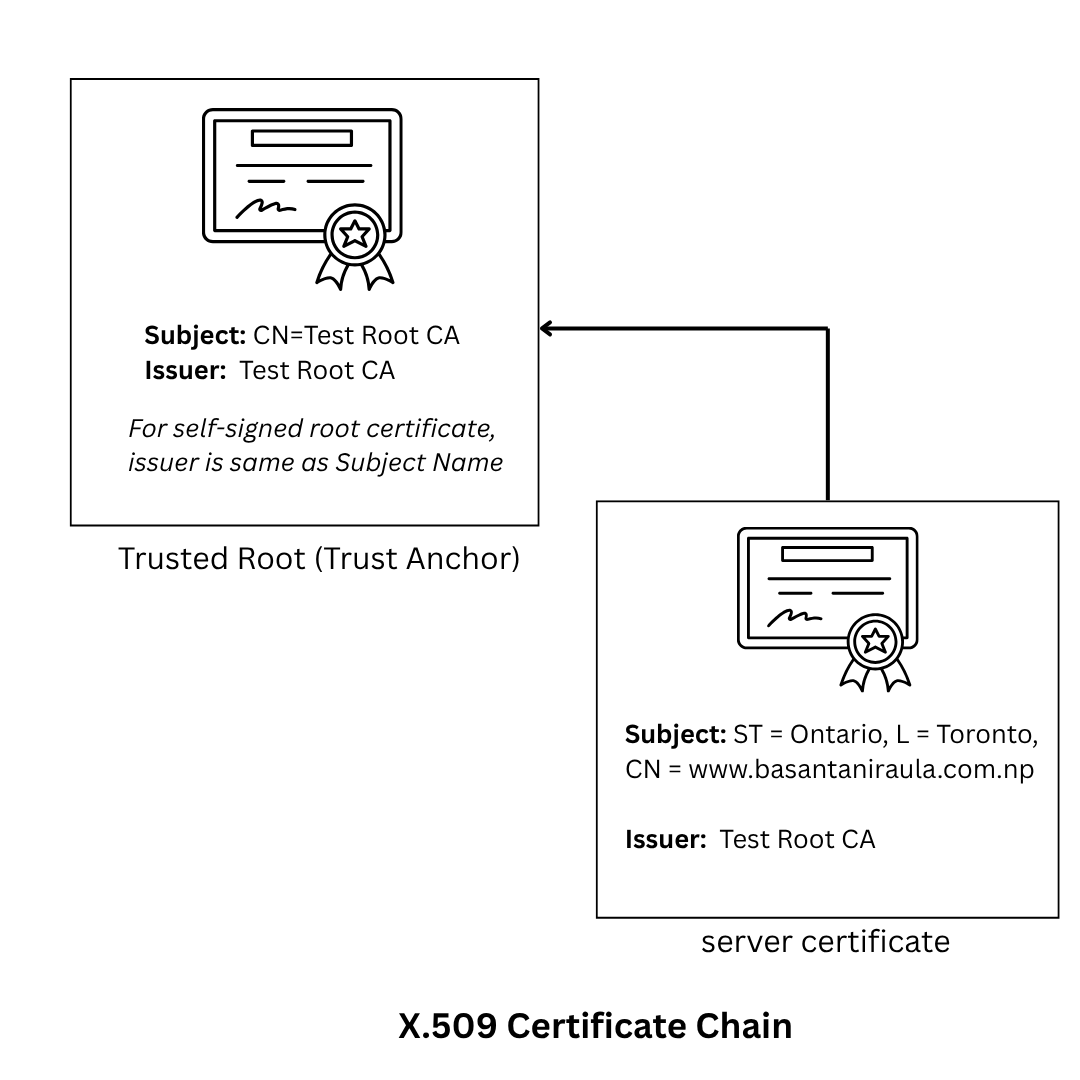
Note: A root certificate (e.g., ca.cert) is stored in OS/browser trust stores. Certificates signed directly or indirectly by it are trusted via the certificate chain, if the root is valid.
-
Sign the Server CSR with the CA
openssl x509 -req -in server.csr -CA ca.crt -CAkey ca.key \
  -CAcreateserial -out server.crt -days 365 -sha256
Part 3: Anatomy of an X.509 Certificate
TLS certificates include:
- Public key
- Subject info (CN, SAN)
- Issuer info
- Validity period
- Digital signature (from CA)
To view the content of certifcate file run following command:
openssl x509 -text -noout -in server.crtOutput:
Certificate:
    Data:
        Version: 1 (0x0)
        Serial Number:
            5a:78:54:77:2f:01:88:ab:fa:e1:b9:00:ff:e1:3d:05:47:fb:40:e6
        Signature Algorithm: sha256WithRSAEncryption
        Issuer: CN = Test Root CA
        Validity
            Not Before: Jun 17 02:04:47 2025 GMT
            Not After : Jun 17 02:04:47 2026 GMT
        Subject: ST = Ontario, L = Toronto, CN = www.basantaniraula.com.np
        Subject Public Key Info:
            Public Key Algorithm: rsaEncryption
                Public-Key: (2048 bit)
                Modulus:
                    00:xx.xx.xx.xx.xx.xx.xx
                    .....long_hexadecimal_strings.....
                Exponent: 65537 (0x10001)
    Signature Algorithm: sha256WithRSAEncryption
    Signature Value:
        86:xx.xx.xx.xx.xx.xx.xx
        .....long_hexadecimal_strings.....
Part 4: Building Trust — How Clients Verify Certificates
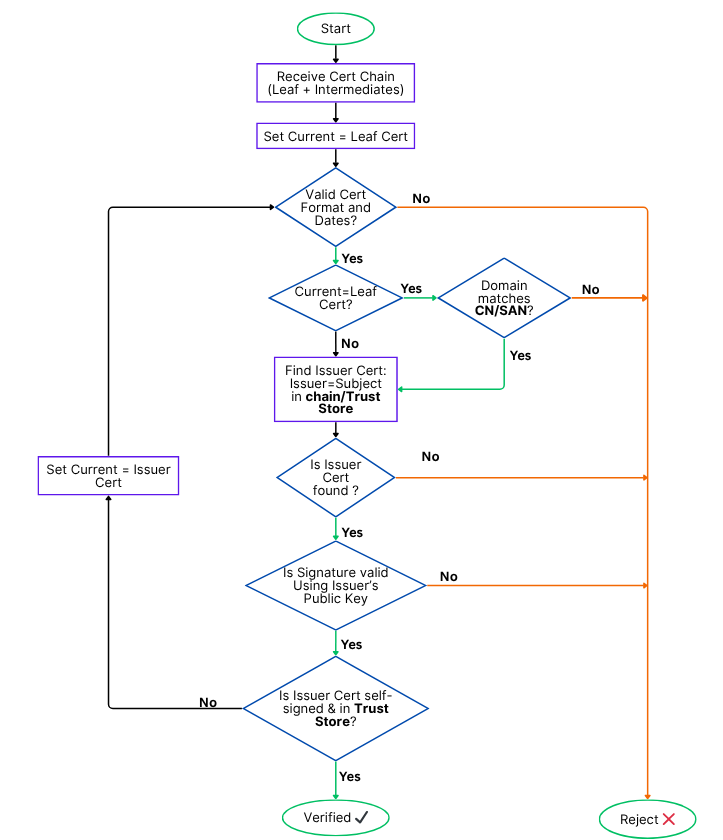
Browsers and OSes have a built-in trust store of CA certificates. When a site presents a certificate:
- Build a trust chain to a root CA
- Verify signatures at each step
- Check hostname matches CN or SAN
- Ensure certificate is valid (date checks)
- (Optional) Check revocation via OCSP or CRL
🖊️ Digital Signatures Explained (Quick Overview)
A digital signature ensures the authenticity, integrity, and non-repudiation of data like certificates or key exchange parameters.
Here’s how it works:
-
The sender hashes the data (e.g., using SHA-256).
-
The hash is encrypted using the sender’s private key, producing the signature.
-
The receiver:
- Decrypts the signature using the sender’s public key.
- Hashes the received data again.
- Compares both hashes.
If the hashes match:
- ✅ Authenticity: The data truly came from the owner of the private key. Only the holder of the private key could have created the signature, and the public key proves it.
- ✅ Integrity: The data was not altered in transit. Any change in the original data would result in a different hash, and the signature verification would fail.
- ✅ Non-repudiation: The sender cannot deny signing it (only they have the private key). Because the private key is unique and secret, the sender is held accountable for the signed content.
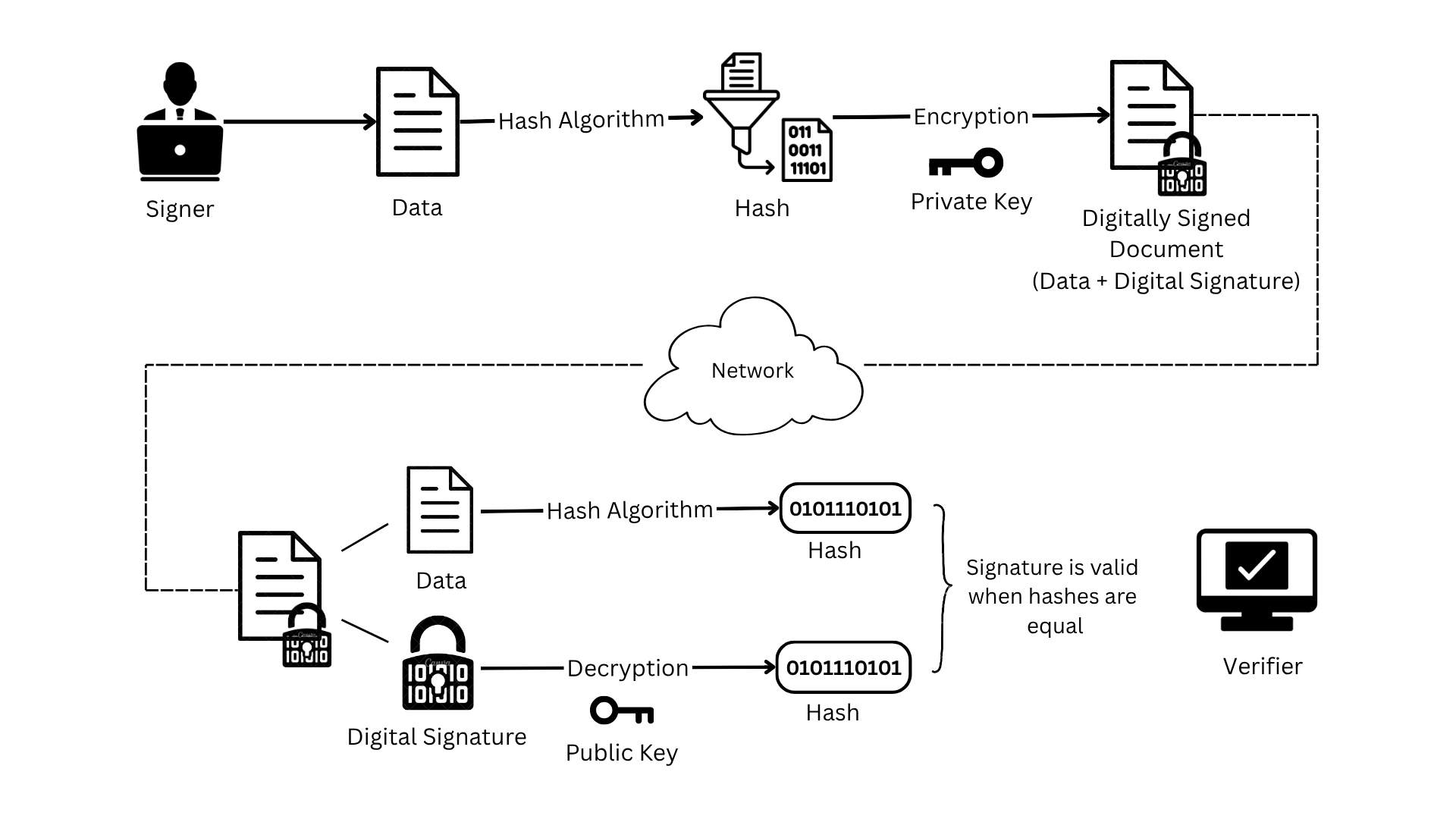
Used in TLS to prove certificate origin and secure key exchange steps.
Part 5: Deep Dive — Key Exchange Methods in TLS
With the foundations of symmetric and asymmetric encryption covered, let’s zoom in on how TLS actually performs key exchange in detail.
There are two dominant methods:
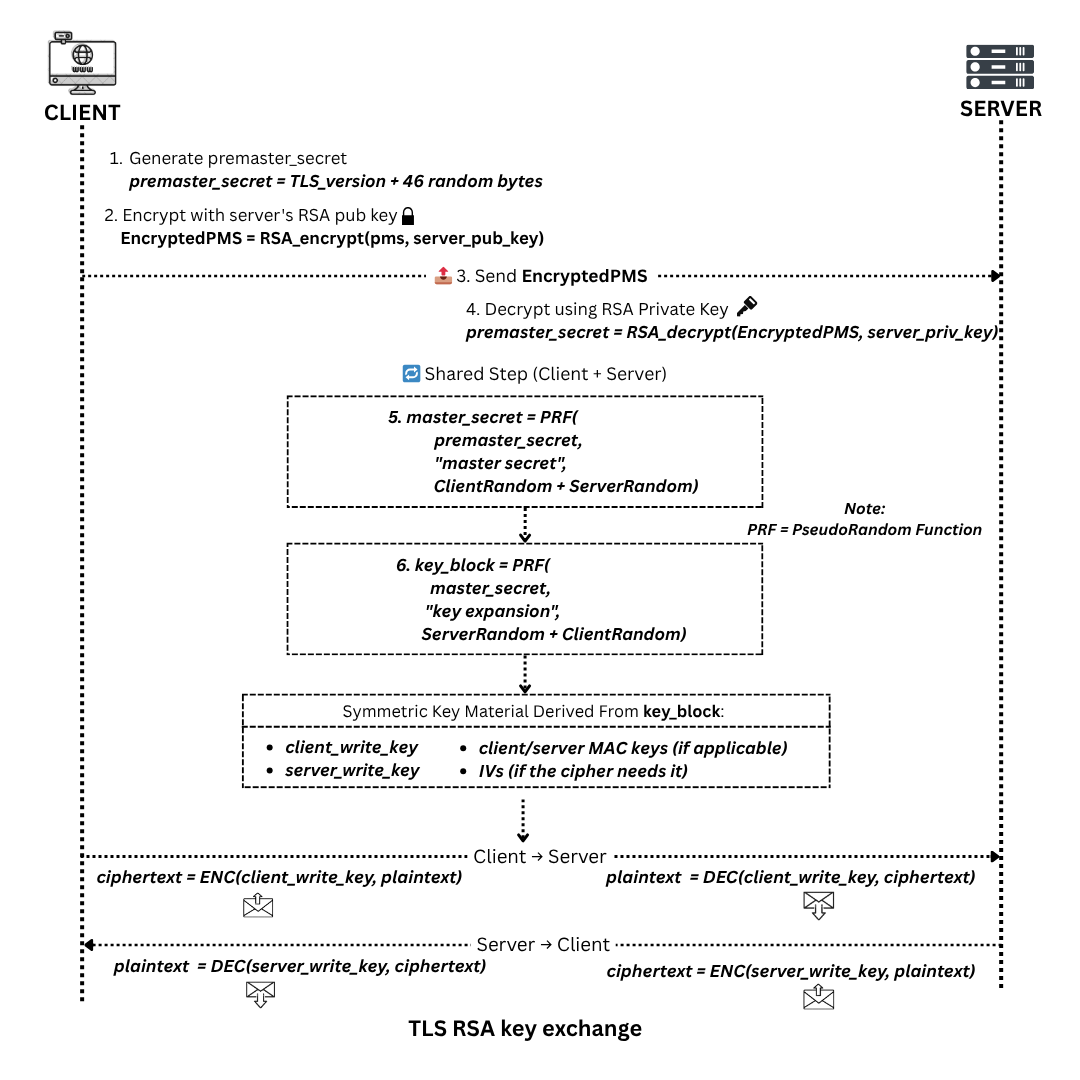
RSA Key Transport
-
The client generates a pre-master secret — a random byte sequence.
-
It encrypts this pre-master secret using the server’s public key (from its certificate).
-
The encrypted pre-master secret is sent to the server.
-
The server decrypts it using its private key.
-
Both client and server compute a master secret using:
- Client Random
- Server Random
- Pre-Master Secret
- A TLS-defined pseudorandom function (PRF)
-
The master secret is then used to derive the symmetric session keys using.
- Client Random
- Server Random
- Master Secret
- A TLS-defined pseudorandom function (PRF)
🔐 Since only the server can decrypt the pre-master secret, the symmetric key exchange is secure.
🔀 ECDHE — Ephemeral Diffie-Hellman
This is the modern, preferred key exchange method in TLS 1.2+.
- The server sends an ephemeral ECDHE public key and a signature of it, signed using the server’s private key.
- The client verifies the signature using the public key from the server’s certificate (authenticating the server).
- The client sends its own ECDHE public key.
- Both parties compute the same shared secret using each other’s public keys and their own private keys.
- That shared secret is used to derive the master secret, just like in RSA.
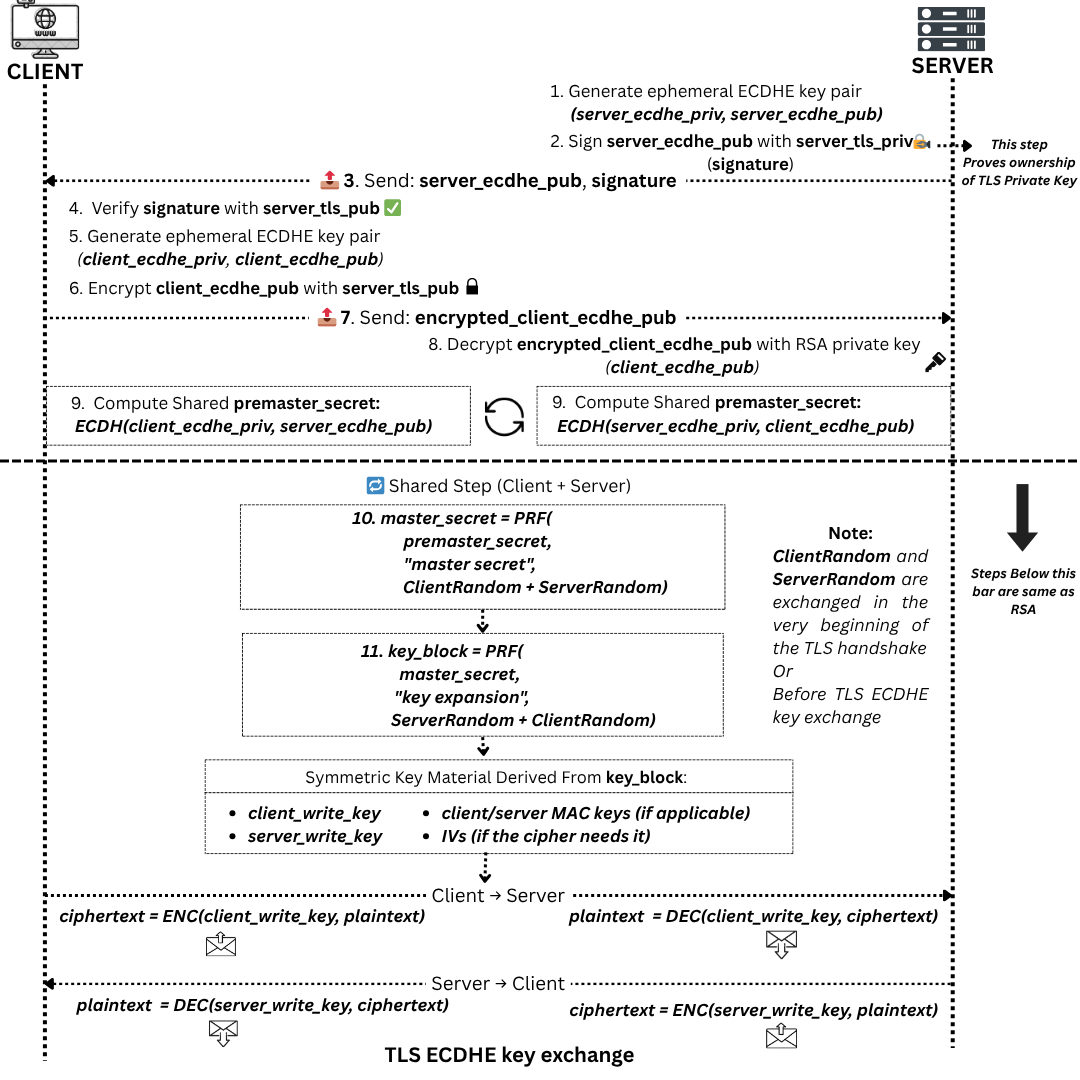
✅ Because the keys are ephemeral (new for each session), perfect forward secrecy is achieved — compromising one session’s keys doesn’t reveal past traffic.
📌 In both RSA and ECDHE, the server’s public key from the certificate plays a critical role in authenticating the key exchange.
Part 6: TLS Handshake Step-by-Step
Let’s walk through the TLS 1.2 handshake flow (without and with mTLS):
Step-by-Step (Server Auth Only)
- ClientHello: Client sends supported TLS versions, cipher suites, random number.
- ServerHello: Server selects version, cipher suite, and sends its random number.
- Server Certificate: Sent to client.
- [Optional] ServerKeyExchange: Sent in ECDHE.
- ServerHelloDone
- ClientKeyExchange: Pre-master secret (RSA) or ECDHE params.
- Client Finished: Sends hashed transcript.
- Server Finished: Confirms both sides derived same session key.
The key exchange process(RSA/ECDHE) shown earlier is a part of the full TLS handshake i.e. step 4 and 6. The steps listed above expand on that to cover the entire session setup, including initial negotiation and handshake finalization.
With Mutual TLS
Between ServerHello and Finished, server also sends CertificateRequest, prompting client to present its own certificate.
Part 7: One-Way vs Mutual TLS (mTLS)
One-Way TLS
- Server presents cert; client verifies.
Mutual TLS
- Both present certificates.
- Used in internal APIs, microservices, fintech, healthcare.
NGINX mTLS Example:
ssl_certificate     /etc/ssl/certs/server.crt;
ssl_certificate_key /etc/ssl/private/server.key;
ssl_client_certificate /etc/ssl/certs/ca.crt;
ssl_verify_client   on;
Client curl Example:
curl https://api.internal.local \
  --cert client.crt \
  --key client.key \
  --cacert ca.crt
Part 8: Hands-On Commands and Troubleshooting
# View full chain:
openssl s_client -connect www.example.com:443 -showcerts

# Read certificate:
openssl x509 -in server.crt -text -noout

# Read CSR:
openssl req -in server.csr -text -noout

# Check expiration:
openssl x509 -enddate -noout -in server.crt
Common Issues
- Expired certificate
- Missing SAN or CN mismatch
- Intermediate CA missing
- Revocation not checked
Conclusion and Next Steps
TLS is more than just a padlock — it’s the foundation of digital trust. This guide covered everything from:
- Key generation and CSRs
- Certificate signing
- Handshake internals
- RSA vs ECDHE
- One-way and mutual TLS
Practice by issuing your own certificates, simulate TLS flows, and configure both NGINX and curl to deepen your understanding.
Stay encrypted, stay trusted. 🔐